Intercept. Inspect.
Forward.

Desktop webhook inspector & forwarder that captures incoming payloads in real-time. See everything, transform anything, forward anywhere.

macOS Windows Linux Tauri v2 SvelteKit 5 Rust
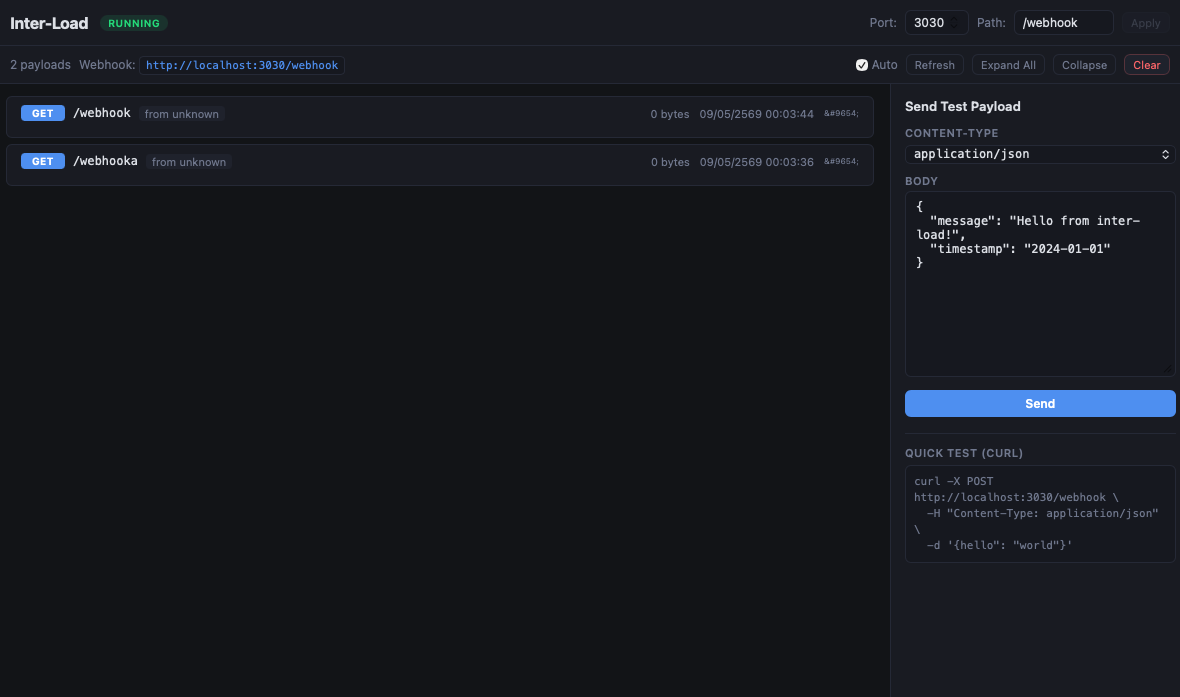
Inter-Load Screenshot

See It In Action

Webhook Source

Payment, GitHub,
Slack, Stripe...

Inter-Load

Inspect, remap,
preview & debug

Your API

Transformed payload
delivered safely

What Can Inter-Load Do?

Capture All Webhooks

Runs a local HTTP server that accepts GET, POST, PUT, PATCH, DELETE — receives everything, no questions asked. Configurable port and path.

Full Payload Inspection

See HTTP method, path, source IP, headers, and body with Pretty/Minified/Raw toggle. JSON auto-formatted for readability.

Visual Mapper & Forward

Remap payload keys, add custom headers, preview before sending, and forward to any endpoint with your chosen HTTP method.

Save & Reuse Rules

Save forward rules for reuse. Auto-forward matching payloads without manual triggers — set it and forget it.

Export Payloads

Export captured payloads as JSON or CSV for further analysis, sharing, or integration with other tools.

Dark & Light Theme

Toggle between dark and light modes. Your eyes, your choice. Also supports WebSocket interception.

How It Works

Start the App

Inter-Load starts a local HTTP server on port 3030 (configurable) ready to receive webhooks.

Point Your Webhook

Set your third-party service's webhook URL to http://your-ip:3030/webhook using ngrok or similar tunnel.

Inspect & Debug

Payloads appear instantly in the UI with full headers, body, and metadata. Filter and search through them.

Forward Anywhere

Remap keys, add headers, and forward the transformed payload to your actual API endpoint.

Watch a Webhook Arrive

A live simulation of what you see when a payment gateway sends a webhook to Inter-Load.

Inter-Load — localhost:3030
POST /webhook
Host: localhost:3030
Content-Type: application/json
X-Signature: sha256=a1b2c3d4...
 
{
  "event": "payment.success",
  "amount": 999,
  "currency": "THB",
  "customer": {
    "name": "John Doe",
    "email": "john@example.com"
  },
  "transaction_id": "TXN-2024-001"
}
 
✓ Payload captured — inspecting...
➜ Forward mapped payload to POST https://my-api.com/payments
✓ 200 OK — Forwarded successfully

Who Uses Inter-Load?

Real-world scenarios where Inter-Load saves your day.

01

Payment Gateway Integration

Connecting Stripe, Omise, or TrueMoney but can't see what fields they send? Inter-Load captures the exact payload so you know the structure before writing a single line of handler code.

StripeOmise2C2P
1
Open Inter-Load — the webhook server starts automatically at localhost:3030/webhook
2
Use Send Test Payload to send a sample JSON and verify the server is working
3
When the payment gateway sends a real webhook — the payload appears instantly on the main screen with method, headers, and body
4
Click on the payload card → switch between Pretty / Minified / Raw views to inspect the JSON structure
5
Open the Mapper tab → select keys to remap (e.g. data.amounttotal)
6
Click Preview to see the transformed payload, then click Forward to send it to your backend
02

GitHub / GitLab Webhook Debug

Building CI/CD automation or chat bots? See the exact push, PR, and issue event payloads — headers, signatures, and branch refs — all laid out clearly.

GitHubGitLabBitbucket
1
Go to Settings → change webhook path to /webhook/github → click Apply to restart the server
2
Use Send Test Payload to send a mock GitHub event like {"action":"push","ref":"refs/heads/main"}
3
When a real GitHub event arrives — inspect headers like X-GitHub-Event and X-Hub-Signature-256
4
Use the Filter search bar to show only specific event types, e.g. filter for pull_request
5
Click Export → JSON/CSV to download all captured payloads for further analysis
03

Third-Party API Migration

Switching from one provider to another? Intercept the old format, visually remap keys to match the new API, and forward — no manual JSON transformation needed.

MigrationKey Mapping
1
Wait for a payload from the old provider to arrive (or use Send Test Payload to paste a sample)
2
Click the payload → open the Mapper tab
3
Select a key to rename — e.g. change cust_name → type customer.fullName
4
Uncheck keys you want to drop from the output
5
Add custom headers the new API needs, e.g. Authorization: Bearer xxx
6
Click Preview to verify → enter the new API URL → click Forward
7
Click Save Rule — future payloads will auto-forward with the same mapping
04

Slack / Discord Bot Dev

Building interactive bots? Capture slash commands, button clicks, and event payloads. Inspect the exact structure and test your responses faster.

SlackDiscordLINE
1
Check current port and path in Settings (default: localhost:3030/webhook)
2
Use Send Test Payload to simulate interactions — Slack block actions, Discord slash commands, etc.
3
When a real interaction arrives — the payload shows type, actions, user, channel fields
4
Use Filter to search for specific fields or values in captured payloads
5
Use Mapper + Forward to transform and send payloads to your bot backend
05

IoT & Sensor Data Monitoring

Devices sending telemetry via HTTP? Watch sensor data arrive in real-time, inspect malformed payloads, and forward clean data to your database or dashboard.

IoTSensorsTelemetry
1
Check the port in Settings (default 3030) — change it if needed, then click Apply
2
Configure your IoT device to POST to http://your-ip:3030/webhook
3
Watch sensor data arrive in real-time on the main screen
4
Click any payload → spot malformed fields, missing data, or incorrect values
5
Use Mapper to keep only the fields you need → click Save Rule to auto-forward clean data to your database
6
Click Export → CSV to download captured data for analysis in Excel or Python
06

SMS & Email Webhook Debug

Working with Twilio, SendGrid, or Mailgun? Capture delivery status, bounce notifications, and reply events to verify your callback handlers work correctly.

TwilioSendGridMailgun
1
Open Inter-Load — server is ready at localhost:3030/webhook
2
Use Send Test Payload to simulate a delivery callback, e.g. {"event":"delivered","message_id":"SM123"}
3
When a real SMS/email event arrives — see MessageStatus, event, reason fields clearly
4
Set up Mapper + Save Rule to auto-forward bounce events to your monitoring system
07

E-Commerce Order Webhooks

Debug Shopify, WooCommerce, or Lazada order events — see exactly what fields come with order.created, order.updated, and refund events.

ShopifyWooCommerceLazada
1
Open Inter-Load → go to Settings → set webhook path to /webhook/shopify → click Apply
2
Use Send Test Payload to simulate an orders/create event with sample order data
3
When a real order comes in — inspect line items, customer info, shipping address, and payment details
4
Use Mapper to extract only the fields your system needs → Save Rule for auto-processing
08

CI/CD Pipeline Testing

Building custom CI/CD notifications? Capture build status, deploy events, and failure alerts from Jenkins, CircleCI, or GitHub Actions to build exactly the right handler.

JenkinsCircleCIGitHub Actions
1
Open Inter-Load — server running at localhost:3030/webhook
2
Use Send Test Payload to simulate a build failure event with status, commit SHA, and logs URL
3
When a real build event arrives — inspect status, commit, branch, and conclusion fields
4
Use Mapper → set up Save Rule to auto-forward only failed builds to your Slack/Telegram alert channel
09

CRM Contact Sync

Syncing contacts between Salesforce, HubSpot, or Pipedrive? Capture contact.created and deal.updated events, remap fields, and forward to your internal CRM.

SalesforceHubSpotPipedrive
1
Open Inter-Load — the server is listening at localhost:3030/webhook
2
Use Send Test Payload to simulate a contact.created event with name, email, company
3
When a real CRM event arrives — inspect all contact fields and custom properties
4
Open Mapper → remap CRM fields to match your internal system (e.g. emailcontact_email)
5
Click Save Rule — all future contact events will auto-sync to your system
10

Monitoring & Alerting Webhooks

Receiving alerts from Datadog, PagerDuty, or Grafana? Capture alert payloads to build custom routing, escalation rules, or notification formatting.

DatadogPagerDutyGrafana
1
Open Inter-Load → check the port in Settings → click Apply if you changed it
2
Use Send Test Payload to simulate an alert with severity, host, and description
3
When a real alert fires — inspect severity, host, metric, and threshold fields
4
Use Filter to find only critical alerts → Mapper to format them for your Slack/Telegram bot
5
Click Save Rule to auto-forward critical alerts only, ignoring low-severity noise
11

AI / LLM Callback Debugging

Building AI agents with OpenAI, Claude, or LangChain? Capture tool-use callbacks, function call results, and streaming event payloads to debug your agent's decision loop.

OpenAIClaudeLangChain
1
Open Inter-Load → the server is ready at localhost:3030/webhook
2
Use Send Test Payload to simulate a function call result, e.g. {"tool":"search","result":{"items":[]}}
3
When your AI agent sends a real callback — inspect the full tool call payload including function.name, arguments, and output
4
Use Pretty view to read nested JSON arguments easily
5
Set up Mapper + Save Rule to auto-forward specific tool results to your logging or evaluation pipeline
12

Crypto & Blockchain Payments

Accepting crypto payments with Coinbase Commerce, BitPay, or custom smart contract events? Capture transaction confirmations, address activity, and settlement notifications.

CoinbaseBitPaySmart Contracts
1
Open Inter-Load → go to Settings → set path to /webhook/crypto → click Apply
2
Use Send Test Payload to simulate a charge:confirmed event with hash, amount, and currency
3
When a real transaction arrives — inspect tx_hash, amount, confirmations, and address fields
4
Verify the signature in headers to ensure the webhook is authentic
5
Use Mapper → extract only tx_hash and amountSave Rule to auto-update your database on confirmed payments
13

Form & Survey Submission Capture

Collecting form data from Typeform, Google Forms, or custom webhooks? See every submission with all fields, validate the data structure, and route it to the right system.

TypeformGoogle FormsCustom Forms
1
Open Inter-Load → check the server is running at localhost:3030/webhook
2
Use Send Test Payload to simulate a form submission with name, email, and answers
3
When a real submission arrives — inspect all form fields, hidden fields, and metadata (submitted_at, user_agent)
4
Use Mapper to rename fields to match your CRM or database schema → click Preview
5
Click Save Rule to auto-forward every new submission to your backend or email service

Questions & Answers

Yes, 100% free and open source under the MIT license. No sign-up, no limits, no premium tier. Download and use it however you want.

Yes. The webhook server runs entirely on your machine at localhost:3030. You only need internet if you want to forward payloads to an external API or receive webhooks from a remote service (via ngrok or similar tunnel).

Use a tunnel tool like ngrok, cloudflared, or localtunnel to expose your localhost to the internet. Point your webhook URL to the tunnel address, and Inter-Load will capture everything.

All payloads are stored in-memory on your machine only. Nothing is sent to any server or cloud. When you close the app, all captured data is gone. Inter-Load has zero telemetry.

Yes! That's the core feature. Pick any key from the incoming payload, rename it, toggle it on/off, add custom keys and headers, preview the result, then forward to any URL. You can also save the mapping as a rule for auto-forwarding.

Inter-Load runs on macOS (Apple Silicon & Intel), Windows (x64), and Linux (x64). Built with Tauri v2 for native performance on all platforms.

Yes. Inter-Load supports both HTTP webhook interception and WebSocket message inspection, so you can debug real-time connections too.

Download Inter-Load

Free & open source. Available for all major platforms.

macOS

Apple Silicon (M1/M2/M3/M4) & Intel

Opens .dmg — drag to Applications.
If "damaged" warning appears, run:
xattr -cr /Applications/inter-load.app

Windows

x64 (.msi installer)

Run the .msi installer.
If SmartScreen warns, click "More info" → "Run anyway".

Linux

x64 (.AppImage & .deb)

AppImage: chmod +x && ./inter-load
.deb: sudo dpkg -i inter-load.deb

Built With

Tauri v2 SvelteKit 5 Rust Axum TypeScript Reqwest